
Job Seeker Resource
How to Write a Strong Resume
A strong resume makes it easier for employers and recruiters to understand your experience, skills, and qualifications. Whether you are applying for your first job, changing careers, returning to work, or looking for your next opportunity, your resume should clearly explain what you have done and what you can bring to a new employer.
This resume guide from SpireTek provides practical resume writing tips, examples, downloadable templates, and a simple step-by-step approach you can use for almost any industry or type of position.
What Makes a Good Resume?
A good resume does not need to be complicated or heavily designed. Its main purpose is to help a recruiter or hiring manager quickly understand:
- Who you are and how to contact you.
- What type of experience you have.
- Where and when you worked.
- What responsibilities and accomplishments you had.
- What skills, education, training, or certifications you have.
Your resume should be clear, accurate, easy to read, and relevant to the position you are applying for.
Free Resume Templates
Start with one of our free resume templates. Keep the structure, replace the sample text with your information, and customize the resume for the jobs you want.
General Resume Template
Best for candidates with previous work experience.
Download TemplateEntry-Level Resume Template
Best for candidates with limited formal work history, recent graduates, students, or career starters.
Download Template1. Start With Your Contact Information
Place your contact information at the top of your resume.
- First and last name
- City, state, and ZIP code
- Phone number
- Professional email address
- LinkedIn profile, if relevant
Example
John Smith
Houston, TX 77084
(713) 555-1234
johnsmith@email.com
You normally do not need to include your full street address.
Do Not Include Sensitive Personal Information
- Social Security Number
- Driver's license number
- Passport information
- Immigration document numbers
- Date of birth
- Bank information
- Other sensitive personal information
2. Add a Professional Summary
A professional summary is a short introduction near the top of your resume. Usually, two to four sentences are enough. Focus on your experience, strongest qualifications, and the type of work you are prepared to do.
Administrative Example
Administrative professional with 4 years of experience in customer service, data entry, scheduling, document management, and Microsoft Office. Experienced in supporting busy office environments and communicating with customers and internal teams.
Warehouse Example
Warehouse Associate with 5 years of experience in shipping, receiving, inventory control, order picking, and forklift operation. Experienced in fast-paced warehouse environments and safety procedures.
Technical Example
Maintenance Technician with experience troubleshooting mechanical and electrical equipment, performing preventive maintenance, and completing equipment repairs in industrial environments.
3. Include Relevant Skills
Create a Skills section that helps employers quickly identify your qualifications. Your skills should be relevant to the jobs you are applying for.
- Technical: equipment operation, troubleshooting, inspection, testing, assembly, maintenance, repair, hand tools, measurements, technical documentation.
- Computer: Microsoft Word, Excel, Outlook, Google Workspace, ERP systems, CRM software, accounting software, industry-specific applications.
- Administrative: data entry, scheduling, document preparation, customer service, filing, reporting, invoicing, office coordination.
- Warehouse & Logistics: shipping, receiving, order picking, packing, inventory, forklift, pallet jack, RF scanners, material handling.
- Professional: team leadership, training, customer service, problem solving, organization, communication, time management.
Important
Only list skills you actually have and are prepared to discuss during an interview.
4. Clearly Describe Your Work Experience
Your Work Experience section is one of the most important parts of your resume. For every position, include:
- Job Title
- Company Name
- City, State
- Month/Year – Month/Year
- Approximately 3–6 bullet points explaining what you actually did
Example
Customer Service Representative
ABC Services – Houston, TX
03/2022 – 08/2025
- Assisted customers by phone and email with account and order questions.
- Resolved customer concerns and escalated complex issues when necessary.
- Processed approximately 40–50 customer requests per day.
- Updated customer records in the company CRM system.
- Coordinated with other departments to resolve customer issues.
Don't Just List Your Job Title — Explain What You Did
✕ Too vague
- Warehouse Associate
- Worked in warehouse.
- Helped with orders.
✓ Better
- Warehouse Associate — XYZ Distribution, Houston, TX | 06/2023 – Present
- Pick and pack customer orders for daily shipments.
- Receive incoming shipments and verify quantities.
- Maintain accurate inventory records.
Specific descriptions make it easier for an employer to understand your actual experience.
5. Include Employment Dates and Locations
For every position, include the location and the month and year you started and ended the job. Choose one date format and use it consistently throughout your resume.
Recommended formats
03/2022 – 08/2025
OR
March 2022 – August 2025
Current job: March 2024 – Present
Do not intentionally change employment dates to hide employment gaps. Accurate information is important during the hiring and employment verification process.
6. Use Numbers When Possible
Numbers can help explain the size and scope of your experience.
Instead of
- Managed employees.
- Processed invoices.
- Helped customers.
Better
- Supervised a team of 12 employees.
- Processed approximately 150 invoices per week.
- Assisted approximately 40–60 customers per day.
Do not invent numbers. Use them only when they accurately represent your experience.
7. Add Your Education
Include relevant education, degrees, diplomas, or training.
Example
Houston Community College — Houston, TX
Associate Degree in Business Administration
2023
- High school diploma or GED
- College or university degree
- Trade school
- Technical training
- Professional training programs
8. Include Certifications and Licenses
If you have certifications or professional licenses related to your work, create a separate section. Include expiration dates when relevant.
- Forklift Certification
- OSHA Training
- CDL
- HVAC Certification
- CompTIA Certifications
- Microsoft Certifications
- CPR / First Aid
- Professional licenses
- Technical certifications
- Industry-specific training
9. Keep Your Resume Easy to Read
- Use a simple layout.
- Use clear section headings.
- Use one or two easy-to-read fonts.
- Use bullet points for work responsibilities.
- Keep spacing consistent.
- Use the same date format throughout the document.
- List your most recent experience first.
- Keep information focused and relevant.
For most job seekers, one or two pages is appropriate.
Resume Formatting Mistakes to Avoid
- Excessive colors
- Decorative graphics
- Large logos
- Complicated columns
- Unusual fonts
- Long paragraphs
- Inconsistent formatting
- Excessive personal information
- Spelling and grammar errors
A simple professional resume is usually easier for recruiters, employers, and applicant tracking systems to review.
10. Customize Your Resume for the Job
You do not necessarily need to create a completely new resume for every application. However, review the job description and make sure your resume clearly shows the experience and skills that are relevant to that position.
Example
If a job requires customer service, Excel, inventory, equipment maintenance, forklift operation, quality inspection, or supervisory experience — and you genuinely have that experience — make sure it is easy to find on your resume.
Do not add qualifications or experience that you do not have.
11. Common Resume Mistakes
- Missing or incorrect phone number
- Unprofessional or incorrect email address
- Missing company names
- Missing job titles
- Missing employment dates
- Missing job locations
- Very limited descriptions of previous jobs
- Unclear abbreviations
- Spelling errors
- Inconsistent formatting
- Outdated information
- Listing skills you do not actually have
- Copying an entire job description instead of describing your own experience
Your resume should accurately represent your own work history.
12. Name Your Resume File Professionally
Avoid
- resume.pdf
- resume123.pdf
- newresumeFINAL2.pdf
Better
- John-Smith-Resume.pdf
Save the final version as a PDF unless the employer specifically requests another file format.
Good Resume vs. Bad Resume: What's the Difference?
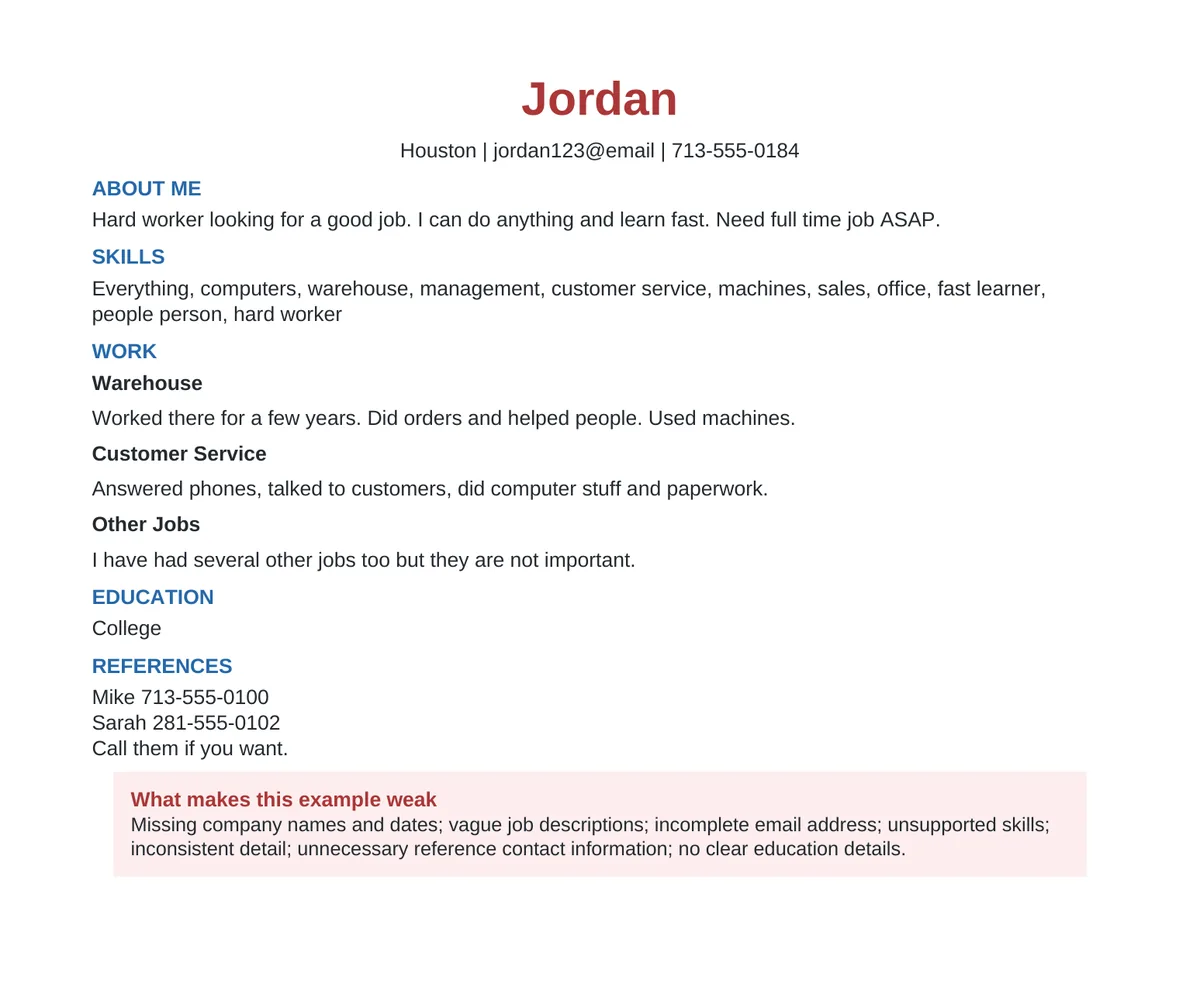
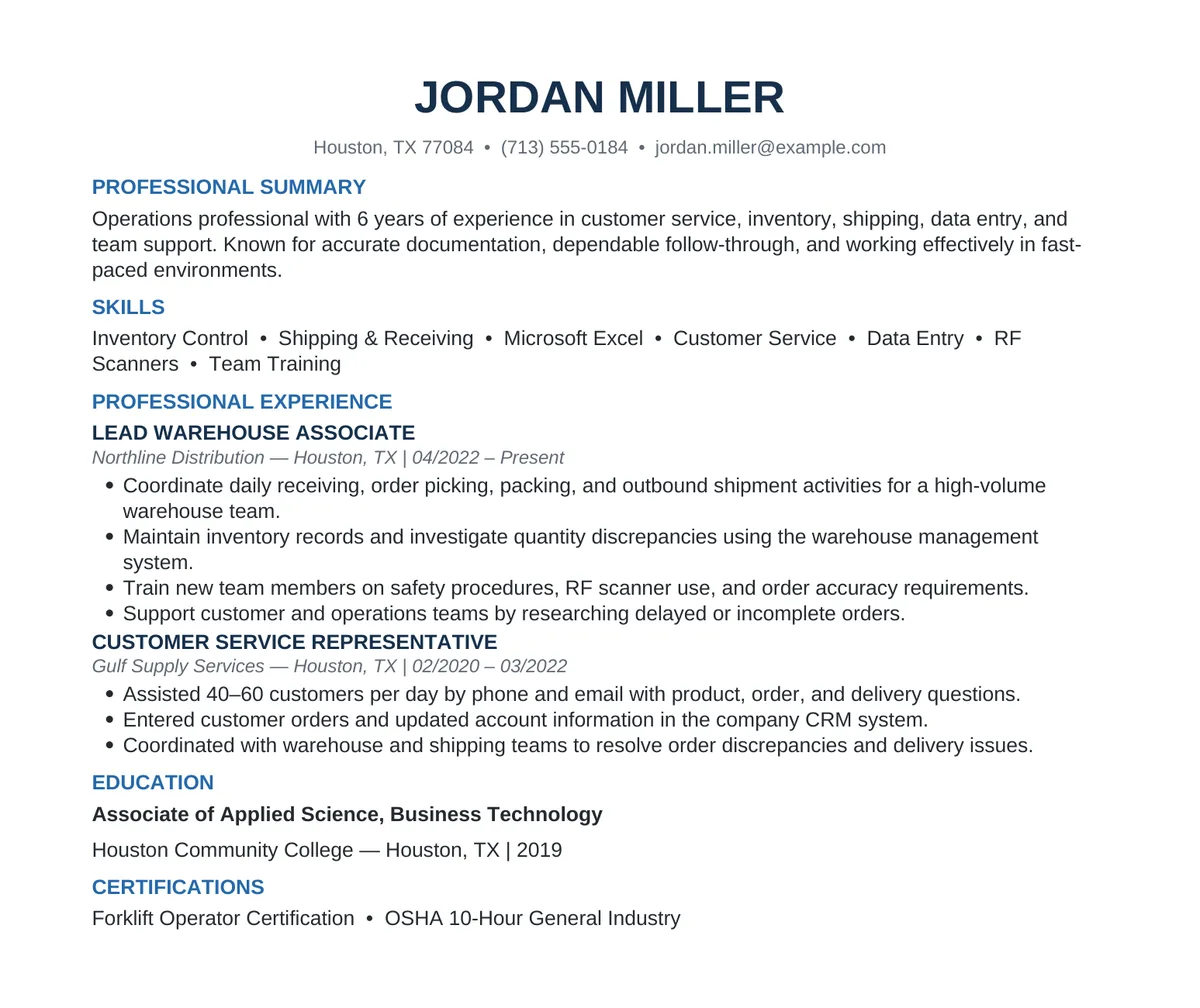
Small details can make a big difference. Compare the examples below to see how clear dates, locations, job descriptions, consistent formatting, and relevant skills make a resume easier to understand.
Resume Checklist Before You Apply
Ready to Find Your Next Opportunity?
Once your resume is ready, take the next step. SpireTek connects job seekers with employment opportunities across Houston and surrounding areas. Opportunities may be available across manufacturing, warehouse and logistics, technical, administrative, office, electronics, IT, and other fields.
Browse our current openings to see which opportunities match your experience, skills, and availability.
FAQ
How long should a resume be?
For many job seekers, one or two pages is enough. The goal is to clearly communicate relevant experience and qualifications without adding unnecessary information.
Should I include every job I have ever had?
Not necessarily. Focus primarily on recent and relevant experience. Older positions may still be useful if they demonstrate skills related to the job you are seeking.
Should I include months and years for my employment history?
Yes. Including both the month and year gives recruiters a clearer understanding of your work history.
Should I include my full home address?
For most resumes, city, state, and ZIP code are sufficient. You normally do not need to include your full street address unless an employer specifically requests it during the application process.
What file format should I use for my resume?
PDF is generally a good format because it helps preserve your resume layout. Always follow the employer's instructions if another format is requested.
Can SpireTek help me find a job?
SpireTek works with employers in Houston and surrounding areas to connect qualified candidates with available opportunities. Visit our Job Openings page to review current positions.